Importing risks from CaseWare® RiskSpace
CaseWare® RiskSpace is an online community that provides free content to help you identify risks. You can import risks from CaseWare® RiskSpace into your template.
You can disable this option from the Risks, Controls and Reportable Items section in the AO- General Options document.

To import risks from CaseWare® RiskSpace:
-
Open any work program, checklist, or document that contains the New Risk
 drop-down.
 -
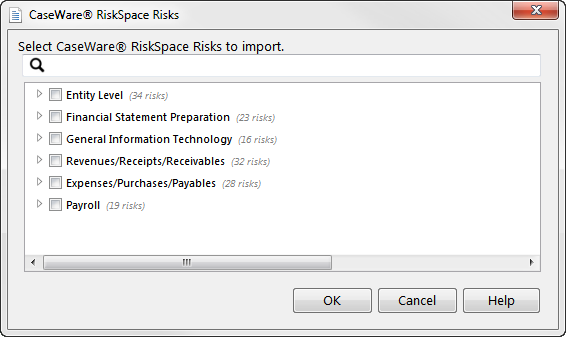
From the New Risk drop-down, select CaseWare® RiskSpace. The CaseWare® RiskSpace Risks dialog appears, in which you can select risks to import.
-
Select the check box next to a folder to import all of the risks that it contains.
-
To import individual risks from a folder, expand the folder and select the check box next to the risk to be imported.
-
When you have finished selecting risks to import, click OK.
-
The New Risk dialog appears, enabling you to edit the risks that you have imported. To edit a specific risk, select it from the drop-down list at the bottom of the dialog. You can also click
 or
or  to move to the previous or next risk to be edited.
 -
Click OK to import the risks into your template.
This online help system applies to all CaseWare Audit, Review and Compilation products. Not all features are available in all products.

Visit us: www.caseware.com | Follow us: 


© 2020 CaseWare International Inc. | Privacy | Terms of Use | Trademarks