-- User --
Management Letter Configure Options
Each letter has the following properties that the user can define:
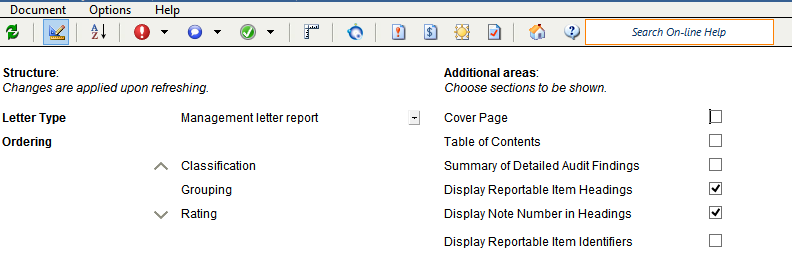
| Property | Description |
|---|---|
|
Letter Type |
Select an applicable letter type. Available types include: Management Letter, Report for those charged with governance, Internal audit. |
|
Ordering |
Click an option and then the up and down arrows to change the ordering sequence. |
|
Cover Page |
Select to add a cover page to the Management Letter. |
| Table of Contents |
Select to add a table of contents to the Management Letter. |
| Summary of Detailed Audit Findings | Select to add a summary of detailed audit findings section to the Management Letter |
| Display Reportable Item Headings | Select to display reportable item headings that are selected to display in the Management Letter . For more information on reportable items, see Reportable Items. |
| Display Note Number in Headings | Select to display note number references in reportable items headings. For more information on note number references, see Creating a Cross- Reference Note Number. |
| Display Reportable Item Identifiers | Select to display reportable item identifiers that are selected to display in the Management Letter. For more information on reportable items, see Reportable Items. |