Using the 9 column financials statements format for consolidations
The 9 column financial statements format also gives you the ability to show the entities on the Balance Sheet, Income Statement, Statement of Retained earnings and the Statement of Cash Flows.
Column headings for the Balance Sheet, Income Statement, Statement of Retained Earnings, and Statement of Cash Flows are all controlled through centralized settings. Click on the Show Column Settings button in the freeze frame at the top of the document or click on the Columns tab in the Home menu.
The column settings allow you to choose various options including:
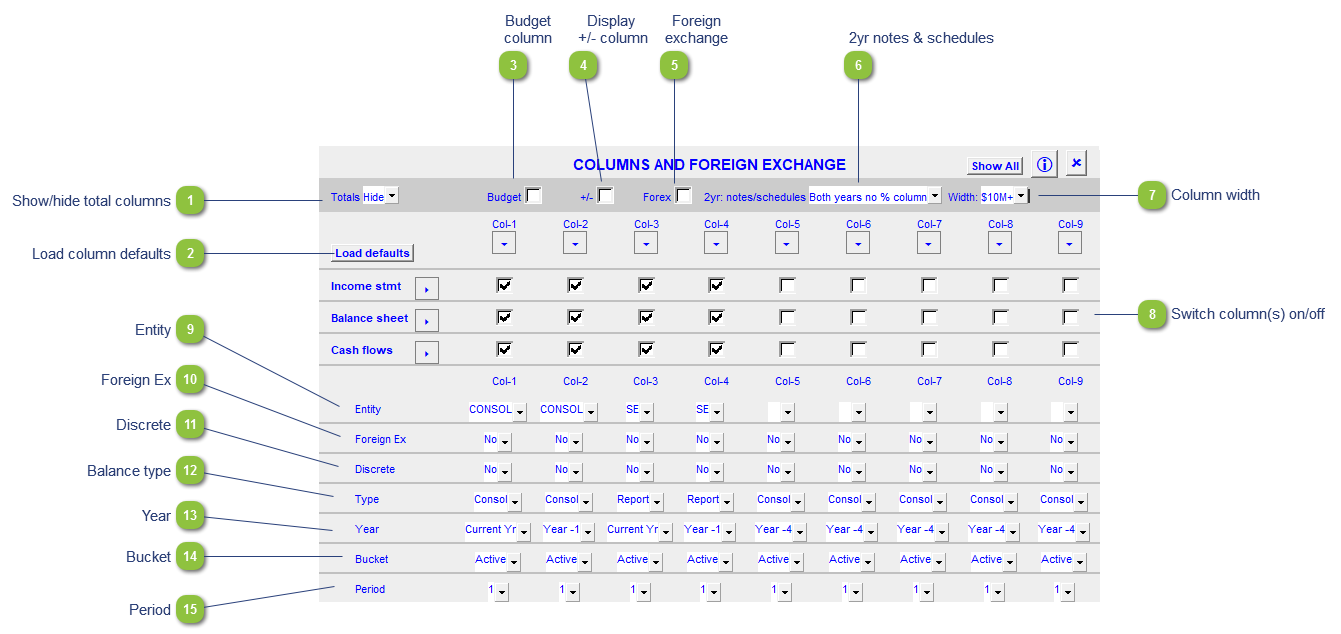
| Number | Name | Description |
|---|---|---|

|
Show/hide total columns |
Show/hide total columns for current year, prior year, or both. |

|
Load column defaults |
Click to reset the column settings to the Resource Centre default. |

|
Budget column |
Show/hide the budget column. |

|
Display +/- column |
Display the +/- button next to the relevant table to allow you to change the signage of that row. |

|
Foreign exchange |
Apply foreign exchange values globally if entered in Caseware. |

|
2yr notes & schedules |
2 year notes and schedules can show single or both years with or without percent columns. |

|
Column width |
Set the minimum or maximum column width |

|
Switch column(s) on/off |
Use the checkboxes to check or uncheck which columns you want to switch on or off for each statement. Click on the Clear (C) or Select (S) button for a column or statement to check or uncheck the checkboxes at once. The following options can only be changed for each individual column if the total columns is set to hide or if the popup menu in the total column for the option is set to As selected. |

|
Entity |
Assign the entities to the relevant columns. Entities should be added using the consolidations dialog in Caseware. |

|
Foreign Ex |
The foreign exchange can also be applied to each individual column(s). |

|
Discrete |
Select the discrete period (Yes = Period movements, No = cumulative balances up to period selected (year-to-date)). |

|
Balance type |
Select the balance type (budget, consolidated, report, adjusted, unadjusted, forecast) that you want to use. This can be used when setting up Group/Company statements. |

|
Year |
Select the financial year (current, prior 1 through 4) for each column. |

|
Bucket |
Select the bucket (active, random, yearly, semi-annually, quarterly, monthly, etc.) for each columns. |

|
Period |
Select the relevant period within the year selected that you want to view. This is dependent on the Bucket selected. |