Statement of Financial Position (Public sector)
The access the Public sector version of the Statement of Financial Position you will need to switch the Jazzit Financial statements to 9 column via the Home menu. Then set your Jazzit Financial Statements to Public Sector via Home menu > Client profile.
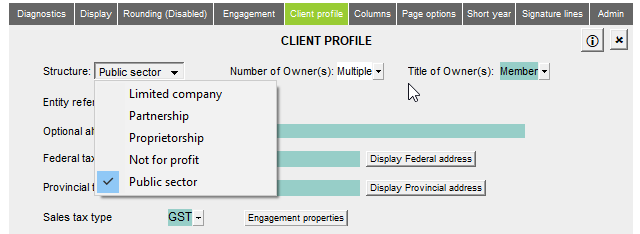
Refer to 9 Column Statements with Budget Column on how to setup the 9-column statement format.
This statement can is used to prepare Public sector statements.

| Number | Name | Description |
|---|---|---|

|
Statement settings |
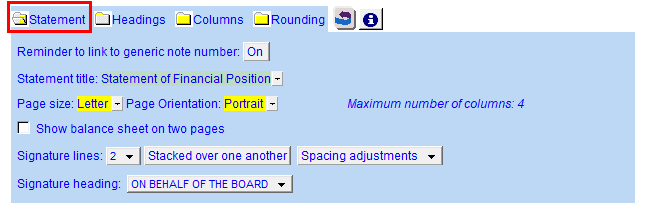
The statement settings provide additional options for the Balance Sheet.
|

|
Heading formatting |
The headings for the Balance Sheet can be formatted. Refer to Statement Section Headings Formatting for more information on the options available. |

|
Columns |
Click on the folder icon to show the column settings. In addition to setting the column headings, you can jump to the global column settings located in Home menu > Columns.
|

|
Show/hide rounding |
Click on the folder icon to show/hide the statement rounding options. See this page for more information on how rounding works in the PSAB Statement of Financial Position. |

|
Column headings *Not Shown here |
This is visible when you open the Columns option. Use the checkboxes to the left of each heading line to skip or print the headings. Select the heading option you'd like to print using the popup menus. The following headings are available:
|

|
Net financial debt |
The Net financial debt is calculated by deducting the assets from the liabilities. |

|
Non-financial assets |
Non-financial assets can be shown at the bottom of the statement. Inventory, prepaid expenses and tangible assets are added as default. Use the express menu to add more lines to the section. Skip the row by either selecting skip from the map popup menu or using 999 to skip an input map number cell if the line appears somewhere else on the statements. |

|
Accumulated Surplus |
Accumulated surplus is not calculated with the numbers above. For diagnostic reasons, the number is sourced from the Statement of Changes in Accumulated Surplus/Statement of Operations. See the page on PSAB rounding for more information. |

|
Accumulated Surplus Consists of: |
Click on the folder icon to show this section. The section is typically manual entry though linked lines can be added.
|



Also included: