Template Specific Options
See Common Working Paper Features for information on features not specific to this working paper.
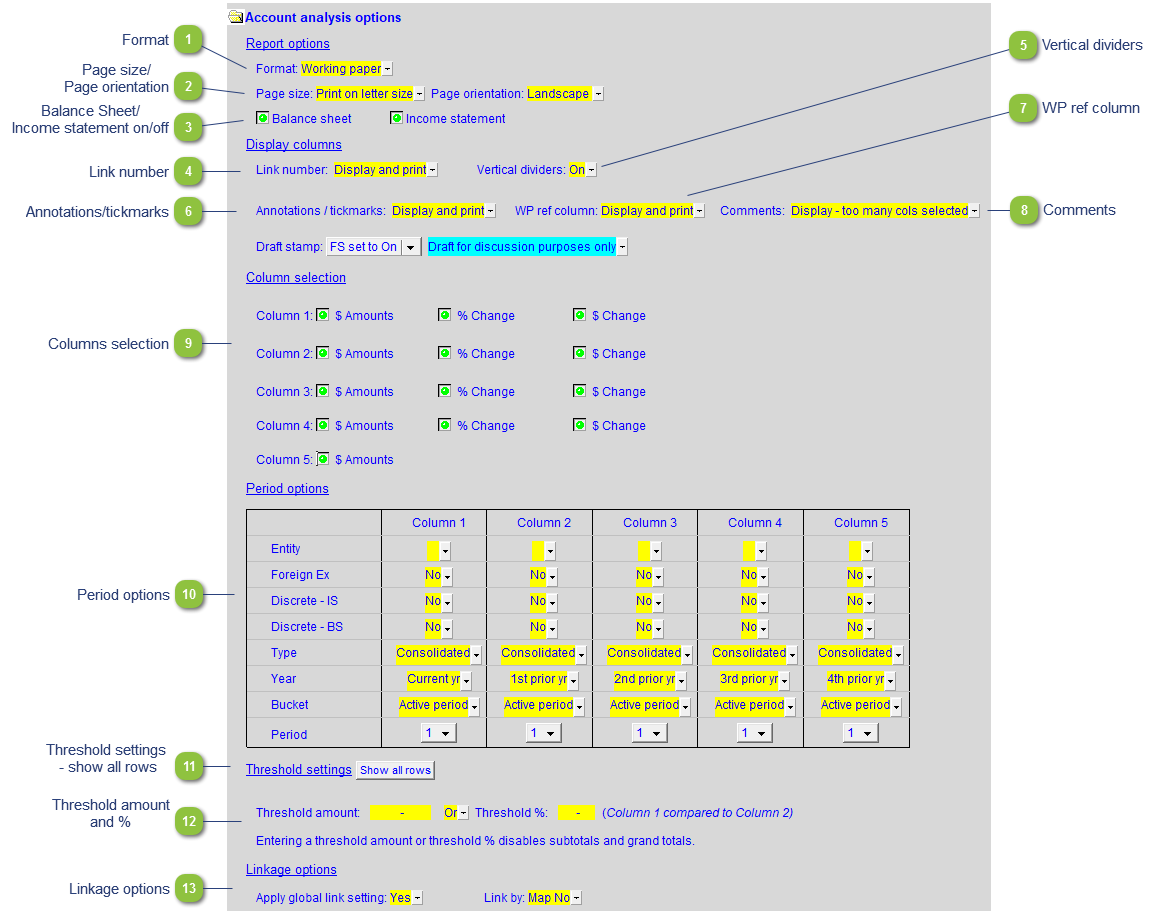
| Number | Name | Description |
|---|---|---|

|
Format |
The format option has 2 presets that allow the working paper to be presented to clients (Client version) or internal use (Working paper):
|

|
Page size/ Page orientation |
Use the yellow popup menus to select the page size and page orientation for printing. The page sizes will be automatically set based on the number of columns selected in the working paper. |

|
Balance Sheet/ Income statement on/off |
Click on the green button to toggle the statements on/off. |

|
Link number |
Use the popup menu to select to Display and Print or just Display the Link numbers.
|

|
Vertical dividers |
Use the popup menu to toggle the divider lines on the statements on/off. |

|
Annotations/tickmarks |
Use the popup menu to select to Display and Print or just Display the Annotations/tickmarks.
|

|
WP ref column |
Use the popup menu to select to Display and Print or just Display the WP reference column.
|

|
Comments |
Use the popup menu to select to Display and Print or just Display the Comments column.
|

|
Columns selection |
Choose which columns to display or hide. There are a total of 5 periods with 3 types of columns for each period, with the exception of period 5 that only has 1 column type. Each individual column can be displayed or hidden as required. |

|
Period options |
Use the period options to set the settings for each column. Refer to 9 Column Statements with Budget Column for detailed information on each field. |

|
Threshold settings - show all rows |
With threshold settings the working paper will automatically hide any line items below a certain % and/or amount change between columns (periods). This is useful for focusing only on items that have significant variances between c1 and 2. The Show all rows next to Threshold settings toggles the threshold function on/off. |

|
Threshold amount and % |
If nothing is filled for either Threshold % or Threshold amount all lines will show even if the function is on. The “and/or” condition between the % and amount threshold can be set with the available dropdown. Entering either a threshold amount or % will disable subtotals and grand totals. |

|
Linkage options |
Like the Jazzit financial statements the working paper links based on map number. This can be changed on a per line basis using the Link type column. Set Apply global link setting to No in order to reveal the Link type column. The dropdowns in the Link type column will allow lines to be linked by: account #, L/S, and group. |