Template Specific Options
| Number | Name | Description |
|---|---|---|

|
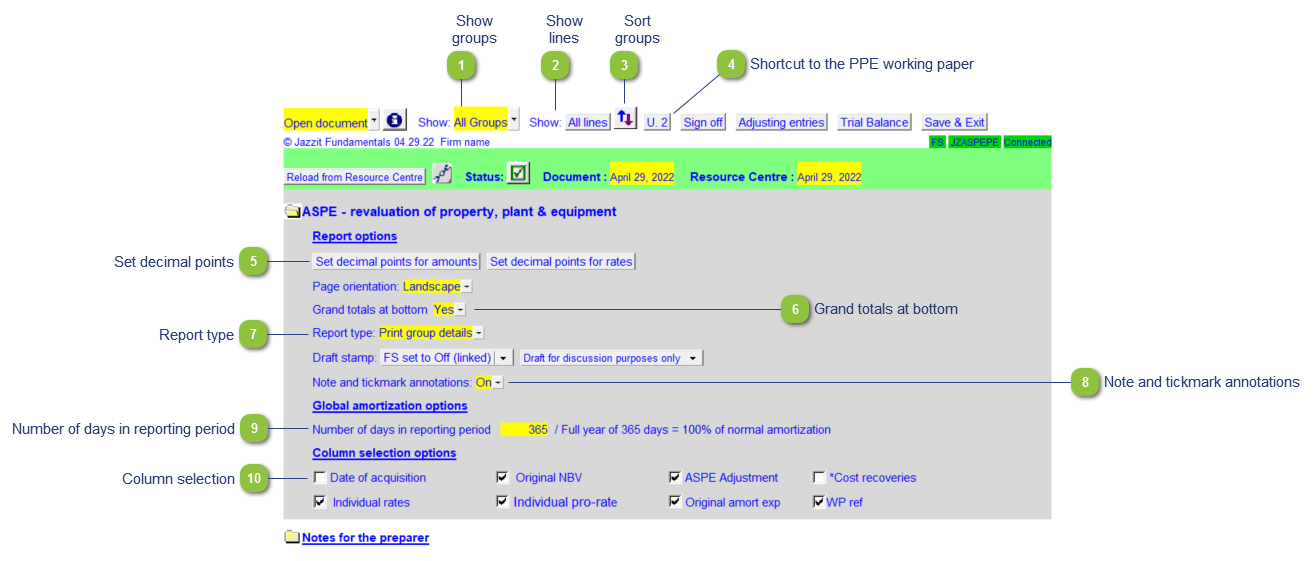
Show groups |
Use the popup menu to select to show all groups or printing groups only. Setting the working paper to show printing groups is helpful when reviewing the working paper. |

|
Show lines |
Use the button to select to show all lines or printing lines only. Set the working paper to printing lines when reviewing the working paper. |

|
Sort groups |
Click on the Sort button to sort the groups into the desired order. Groups can be sorted both manually and alphabetically. |

|
Shortcut to the PPE working paper |
Click here to open the Property, Plant and Equipment (CA/CB) working paper. This button will renumber itself based on what the CA or CB working paper is numbered as. |

|
Set decimal points |
Set the decimals for the amounts and rates. |

|
Grand totals at bottom |
Toggle grand total for schedule on or off. |

|
Report type |
Print group details or group summary. |

|
Note and tickmark annotations |
Show or hide the note and annotations column. |

|
Number of days in reporting period |
Indicate the number of days within the reporting period. |

|
Column selection |
The columns selection options allow you to choose which columns you want to print on the working paper. |