Letter Signatures
Most letters have the signature block at the bottom of the letters.
| Number | Name | Description |
|---|---|---|

|
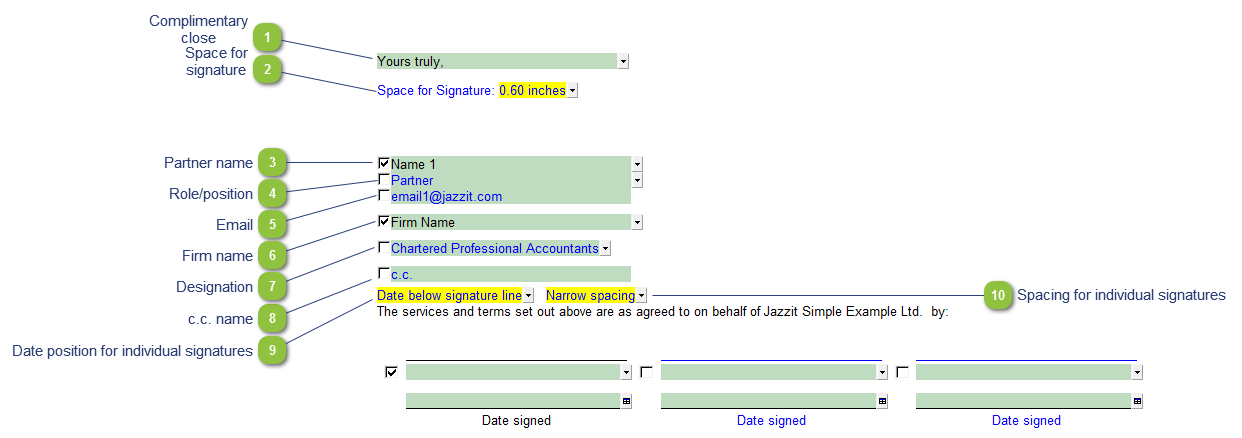
Complimentary close |
Use the popup menu to select your desired complimentary close or input your own text into the field. |

|
Space for signature |
Increase or decrease the spacing for the signature. |

|
Partner name |
Use the checkbox to print or skip the signatory name. Use the popup menu to select another name. The names are populated from the Partners Name section in the Firm profile (RD) KLIB module. |

|
Role/position |
Use the checkbox to print or skip the signatory role/position. Use the popup menu to select an alternative role or input your own text into the field. |

|
|
Use the checkbox to print or skip the signatory email address. The email address is populated from the Partners Name section in the Firm profile (RD) KLIB module. |

|
Firm name |
Use the checkbox to print or skip the firm name. The firm name is populated from Firm profile (RD) KLIB module. |

|
Designation |
Use the checkbox to print or skip the designation. The designation is populated from Firm profile (RD) KLIB module. |

|
c.c. name |
Use the checkbox to print or skip the c.c. field. Use the input cell to type in the c.c. name field. |

|
Date position for individual signatures |
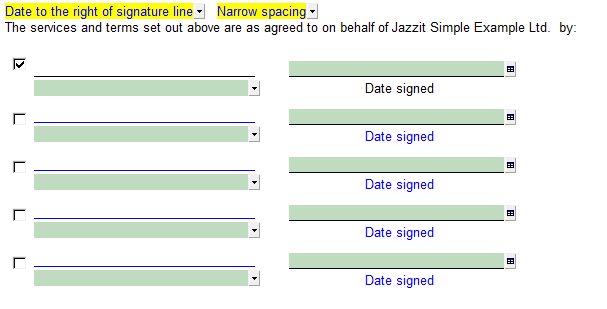
Position the date relative to the individual signatures, either below or to the right of the signature.
|

|
Spacing for individual signatures |
Modify the spacing between individual signatures in the signature area below. |